
Morning Garden. 1st May, 2025.


Morning Garden. 1st May, 2025.


Lloyd Center, Portland, Oregon. 9th May, 2025.
Three thoughts from a week of calorie counting on a low carb diet, with no pre-planning:
IBM replaces HR with AI:
International Business Machines Chief Executive Arvind Krishna said the tech giant has used artificial intelligence, and specifically AI agents, to replace the work of a couple hundred human resources workers. As a result, it has hired more programmers and salespeople, he said.
Replacing HR with AI seems like a positive development to make it totally clear that HR is there to protect employer, not employees.

Bee butt and the bee’s knees 😄

Sunrise over the hill in Kona, Hawaii. 22nd March, 2025.
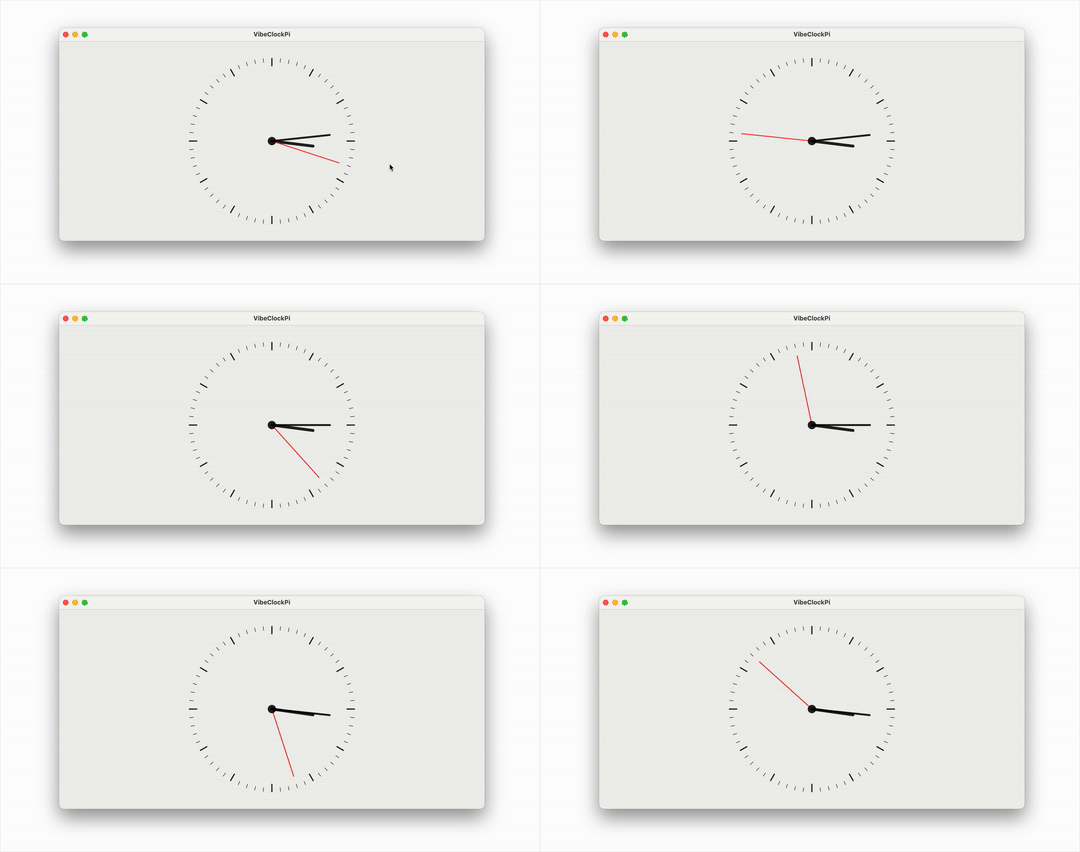
When I wrote up Piterator.swift on Pi Day earlier this month, I was actually trying to do something with the values it returns but I didn’t get around to that fun part due to lack of time.
A few days after that I imagined a clock face where the seconds hand moves in jumps of the values returned by the iterator at the rate of once per second. So as the values start coming in like 3, 1, 4, etc, the second hand jumps by those many seconds.
I started to write the code for a Mac app but Quartz 2D drawing is not something I have ever really done, so it was tricky wrapping my mind around the coordinate system and laying out individual marks on the canvas.
Fast forward to yesterday when I decided to try out vibe coding for this project. As I got going though, it became more of an AI assisted coding because I started to edit it myself after a couple of initial rounds of code generation. Old habits die hard!
For this purpose I used the recently released Google’s Gemini 2.5 Pro via LLM, essentially as described in this post.
I was very impressed by the code generation. The first prompt I gave was for a static drawing, and it was thus:
llm -m gemini-2.5-pro-exp-03-25 "Write a SwiftUI View that draws a clock face on a Canvas. It should draw each of the 60 tick marks, with 0 and every multiple of 5 being a slightly thicker tick mark. It should also draw the time using an hour hand, a minute hand and a second hand. The second hand should be red. The time should be 10th hour, 10th minute, 30th second."
The result was exactly as I expected. It even improvised and put that little circle in the center which was a nice touch.
Then I gave it this second prompt which also included the Piterator.swift code:
files-to-prompt . -e swift -c | \
      llm -m gemini-2.5-pro-exp-03-25 -s \
      'Update the ClockView to make it animatable using TimelineView. Then hook it up to Piterator so that every second, the second hand moves forward by as many seconds as the number returned by the Piterator.'
This generated code that had a couple of small bugs that raised compiler errors. After I resolved that I had it working exactly as I envisioned it, and the whole thing took about an hour 🤯
I have decided to stop development of Mimi Uploader. The current beta will not be released, and there will be no more releases in the future.
The app will still be available in the App Store and continue to work. If I decide to remove it completely, I will give at least one month’s notice.
I thank you all for your support over the five year lifespan of this app.
If you’re wondering why I’ve decided to do this, please read on, although you might also want to read about the history of Mimi Uploader that I wrote 18 months ago.
So anyway, here are some reasons that went into the decision, although no single one was dominant:
Thanks for a great five-year run 😊
Yesterday it dawned on me that it was Pi Day Eve, so obviously, I whipped up a little Swift iterator that iterates over values of Pi from Pi Delivery. You can get it at this gist.
Use it in your swift code and make fun stuff using the value of Pi up to 100 trillion digits!
Happy Pi Day!

John at Level Beer. 28th February, 2025.
On Friday, I met up with some friends for happy hour. I got there early and was waiting when this guy noticed that I had a camera on me and asked for a photo. He was in a group that seemed to have come by after playing soccer.
